Live Q&A
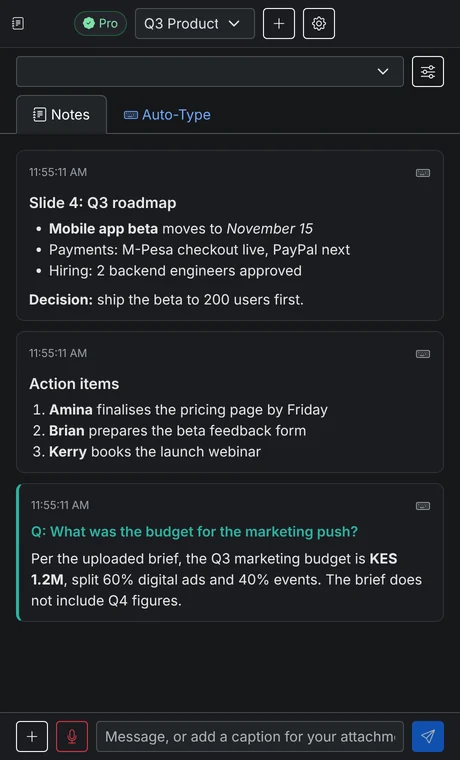
Hears questions from the meeting audio and answers in seconds, using your uploaded material first.
VerbaPilot AI reads your screen, listens to the meeting and answers questions the moment they're asked, using your own slides and documents first, on your own AI key.
Works alongside
Features
Everything runs from a small app beside your meeting, so you never switch between five tools.
Hears questions from the meeting audio and answers in seconds, using your uploaded material first.
Capture any screen or window. Text is read on your computer, then turned into clean notes.
Record your mic and meeting audio together and get a tidy summary with decisions and action items.
Types notes into any app, even ones that block pasting. Instant or natural speed, and Esc stops it.
Upload slides, briefs or PDFs once. Answers come from your documents before general knowledge.
Use ChatGPT, Claude or ChatAnywhere at their prices. Keys are encrypted and never leave your computer.
How it works
Install the app for Windows, macOS or Linux. Signing in starts your free 3-hour trial.
Choose the window to watch, and upload slides, briefs or PDFs as reference material.
Notes and answers appear as the meeting happens. Send any of them to Auto-Type with one click.
Privacy and security
VerbaPilot AI is a desktop app, not a cloud notebook. Your meetings stay with you.
Pricing
Start with a free 3-hour trial. No card, no API key.
After your trial, keep the basics on your own AI key.
$0 · no card needed
Everything, billed every month.
or $15 with PayPal or card
Everything in Pro, billed once a year.
KES 1,292 a month · or $120 with PayPal or card
FAQ
VerbaPilot AI works with an API key from OpenAI (ChatGPT), Anthropic (Claude) or ChatAnywhere. You pay the provider directly at their normal rates, with no markup from us. Your key is encrypted on your computer and your AI requests go straight to the provider you choose.
No. The 3-hour trial runs on our AI, so you can try every Pro feature right after you sign in. Add your own key whenever you like.
Only active AI use counts: a note or screenshot summary uses 30 seconds, a Live Q&A answer 20 seconds, and recorded audio its own length. Leaving the app open costs nothing.
It depends on how much you use it and which model you pick. You pay the provider directly, and most providers let you set a monthly spending limit in their dashboard.
Your account is active on one computer at a time. You can move it to another computer up to 3 times in 30 days, and remove a lost laptop from your account page.
Pay with M-Pesa (a prompt on your phone, or Paybill from the M-Pesa menu) or with PayPal and cards. PayPal can renew automatically; you can cancel anytime.
Not if you turn on privacy mode (Pro, and included in the trial). Your notes stay visible to you but are left out of screen shares and recordings in apps like Zoom, Teams and Meet. It works fully on Windows 10 (2004 or newer) and 11; on macOS some apps can still capture it, and it is not available on Linux.
Screenshots are read on your computer (on-device OCR), documents are processed locally, and notes stay on your computer. With your own key, AI requests go directly to your provider. During the trial they pass through our server, which records usage counts but not the content.
Yes. Live Q&A listens to your computer’s audio, which works best on Windows; on macOS and Linux you may need a virtual audio device such as BlackHole. Everything else works the same on all three.
No card and no API key needed. Download, sign in, and your trial starts.